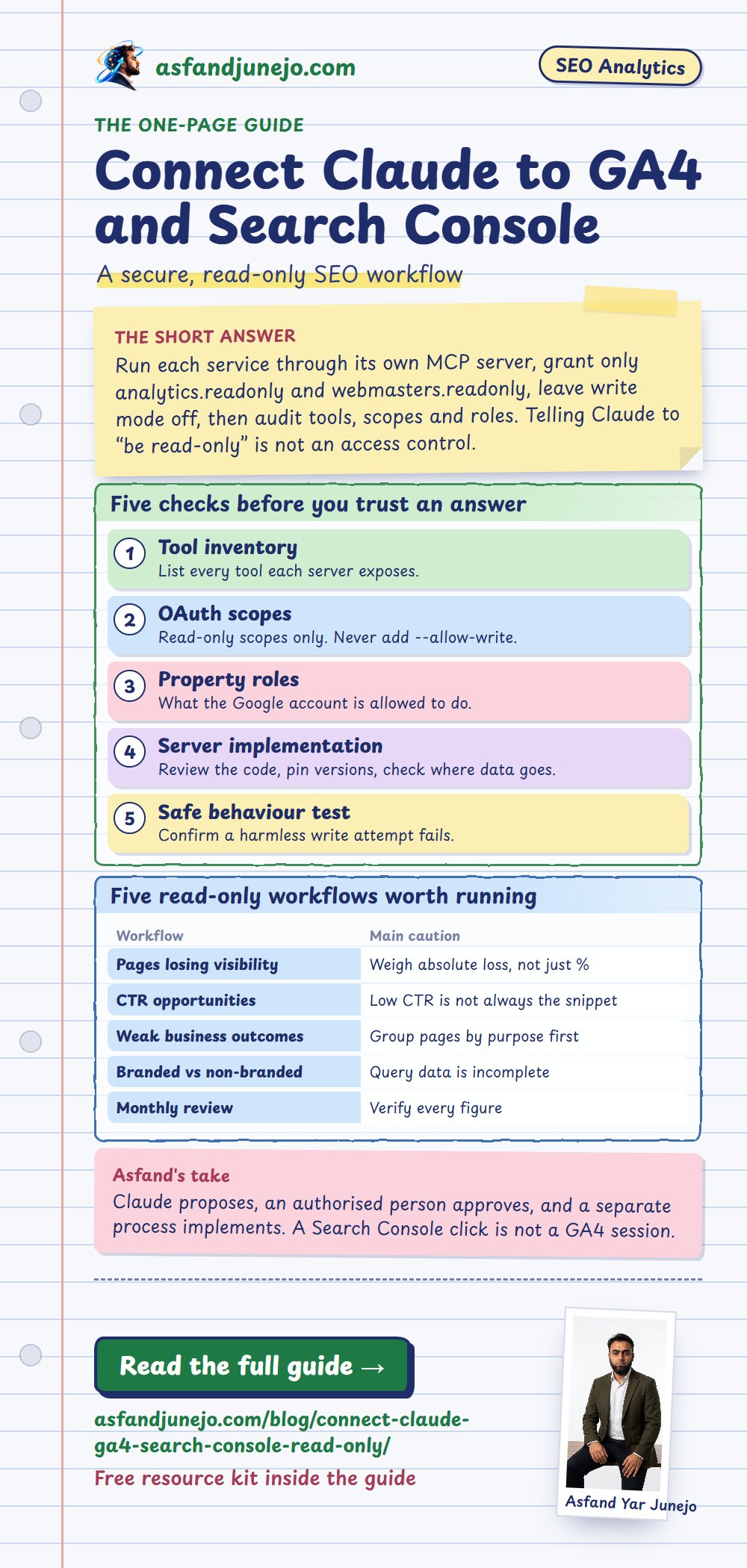
To connect Claude to Google Analytics 4 and Search Console safely, run each service through its own local MCP server, grant only the read-only OAuth scopes (analytics.readonly and webmasters.readonly), leave Analytics write mode off, and then audit the tool list, scopes and property roles before you trust any answer.[1][4] Telling Claude to "be read-only" is a task instruction, not an access control, and a successful connection test only proves that requests work.
Published · Last reviewed · By Asfand Yar Junejo, publisher asfandjunejo.com
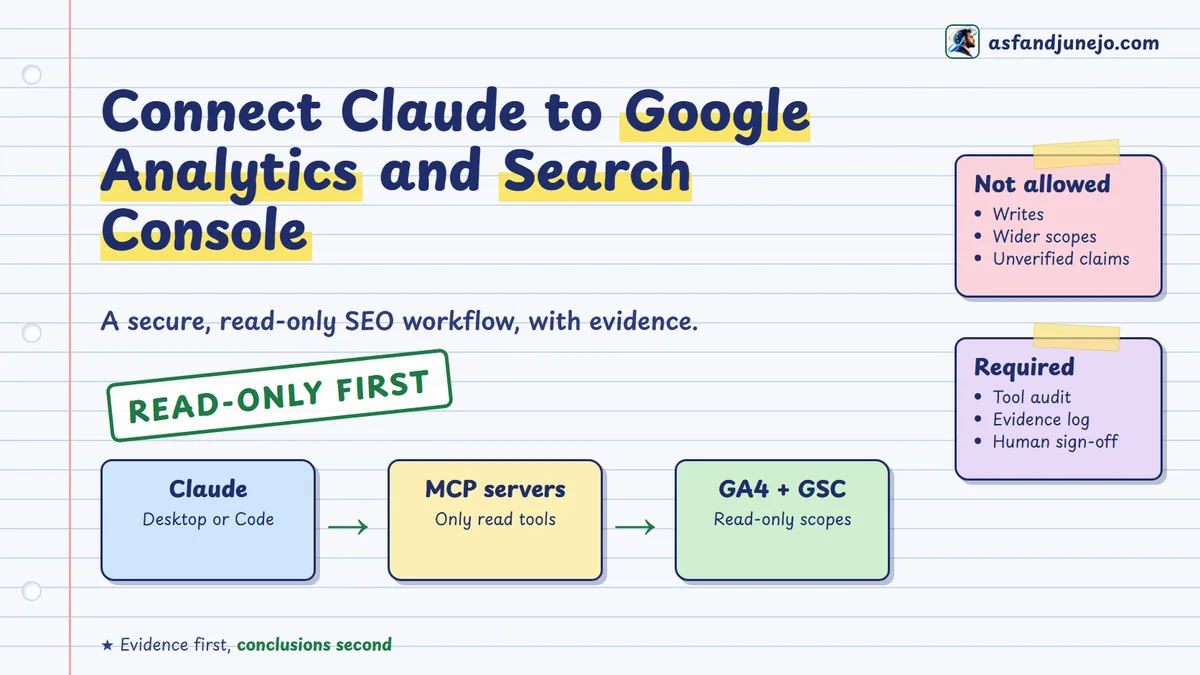
Connecting an AI assistant to analytics data does not make its analysis accurate or its access safe. A server may expose more permissions than you intended, an MCP server may support modification, and a plausible reason for a traffic drop may have no evidence behind it. This guide builds the foundation in order: restrict access, expose only the operations you need, and keep every important conclusion traceable to the numbers retrieved.
It covers Claude Desktop and Claude Code, Google's official Analytics MCP server, and a reviewed third-party Search Console server. It ends with the investigation method, a reusable prompt and an evidence log. A free resource kit (checklist, workbook, prompts and playbook) is at the download section.
What are the key takeaways?
Read-only is a property of the whole setup (tools, scopes, roles and server code), not of a prompt, and a connected assistant still needs evidence for every claim.
- Two servers, two reviews: Google maintains the Analytics MCP server; Search Console has no Google-maintained equivalent, so each community server needs its own review.[2][9]
- Scopes: use
analytics.readonlyandwebmasters.readonly; never the edit or read/write alternatives for analysis.[3][4] - Write mode exists: the Analytics server has an optional
--allow-writeflag. Do not add it.[2] - Five checks: tool inventory, OAuth scopes, property roles, server implementation and a safe behavior test.
- Metrics differ: a Search Console click is not a GA4 session, and the two will not match exactly.[7]
- Decisions stay human: Claude proposes; an authorized person approves; a separate process implements.
What does connecting Claude to GA4 and Search Console actually do?
It lets Claude request GA4 and Search Console data through MCP tools and interpret the results in conversation; it does not change Google's metric definitions, API limits or the need for evidence.
Once authenticated, an MCP server turns a supported tool request into a Google API call and returns structured data. What Claude can retrieve depends on the server, the account's permissions and the operations the server exposes. A routine investigation shows the value: organic sessions fall, so you check Search Console clicks and impressions, compare GA4 landing pages, see whether the fall sits on mobile, and ask whether business outcomes fell too. MCP replaces the switching between dashboards and exports. It does not establish cause.
What can Claude retrieve from Google Analytics 4?
Google's experimental Analytics MCP server connects to the Admin and Data APIs. Its documented tools cover account and property discovery, property details, custom dimensions and metrics, and several report types.[1][2]
| Tool | Purpose | Access |
|---|---|---|
get_account_summaries | List accounts and properties you can reach | Read |
get_property_details | Property settings and metadata | Read |
get_custom_dimensions_and_metrics | Inspect custom definitions | Read |
run_report | Standard reporting | Read |
run_funnel_report | Funnel reporting | Read |
run_realtime_report | Real-time reporting | Read |
list_google_ads_links, list_property_annotations | Linked ads accounts, annotations | Read |
create_property_annotation | Create an annotation | Write, needs --allow-write |
The server retrieves data; it does not decide whether a movement matters commercially. Google's documentation describes a read-only integration, yet the repository documents the optional --allow-write mode and the analytics.edit scope for that one write tool. Read-only behavior is therefore a property of your configuration and its effective permissions, not of the software in general.[2]
What can Claude retrieve from Search Console?
The Search Analytics API reports clicks, impressions, click-through rate (CTR) and average position by dimensions such as query, page, country, device and date. Other methods return property and sitemap information and URL Inspection data, subject to permissions and quotas.[5] Search Console connections usually rely on an independent server, so the toolset varies. One server might expose only property discovery, reporting and inspection; another might also submit sitemaps. The existence of an MCP connection does not tell you it is limited to reads.
| OAuth scope | Permitted access |
|---|---|
webmasters.readonly | Read-only Search Console API access |
webmasters | Read and write Search Console API access |
For analysis, the narrower scope is the default.[3]
What does the combined connection not establish?
It does not produce one reconciled SEO dataset. The two platforms use different measurement systems, dimensions, attribution and processing rules, so their outputs differ by filtering, time zones, freshness and API limits. Claude can help investigate those gaps, but it must not be told to force agreement between metrics that count different events. The value lies in organizing several sources of evidence while preserving each one's boundaries.
How does the Claude, MCP and Google architecture work?
Claude calls tools exposed by local MCP servers; each server uses Google credentials to call the Analytics or Search Console API and returns data that Claude analyzes, which a human then verifies and decides on.
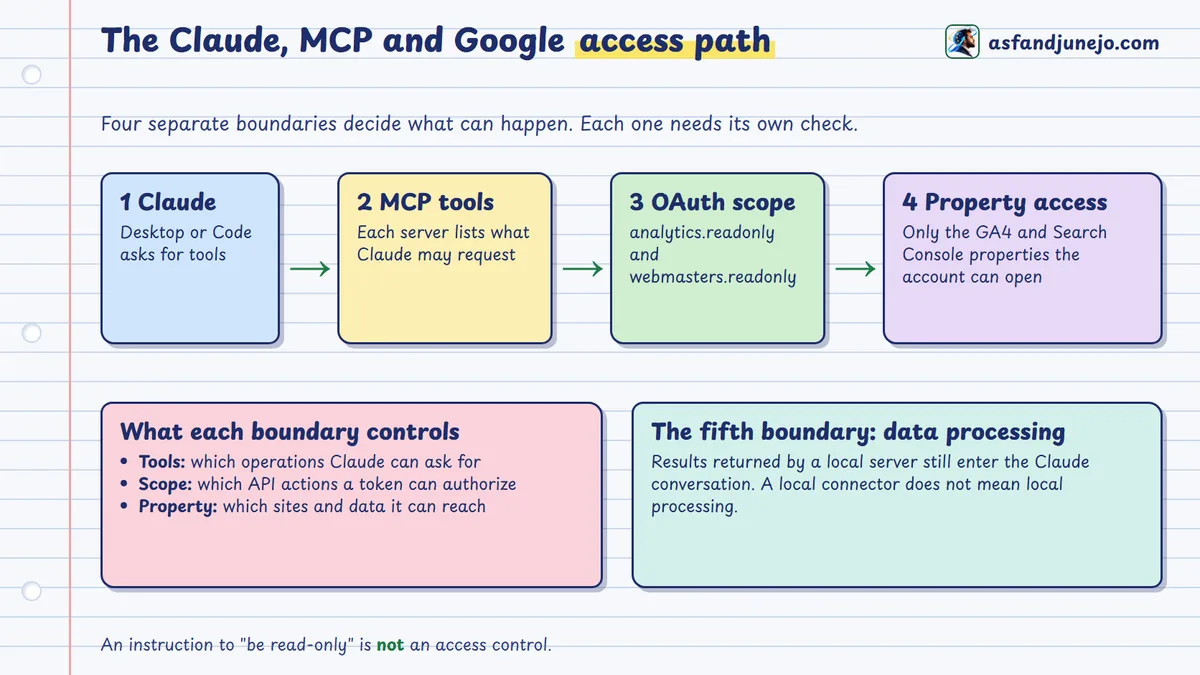
A local workflow has a compatible Claude client, one or more MCP servers, Google credentials and the Google APIs. The MCP server is an integration layer, not a replacement for either product. Many local servers use the stdio transport: the client launches the process and talks to it over a local connection. Remote MCP servers differ in hosting, authentication and network security, so local instructions do not transfer unchanged to a cloud connector.[8]
Where does access control actually happen?
| Boundary | What it decides | What it does not do |
|---|---|---|
| MCP tool | Which operations Claude can request | Limit what a token could do if another tool existed |
| OAuth scope | Which API actions the credential can authorize | Grant access to a property the account cannot open |
| Property access | Which GA4 properties or Search Console sites are reachable | Restrict what the scope allows within them |
| Data processing | What returned data enters the model context | Prevent disclosure just because writes are blocked |
These solve different problems. Blocking modifications does not prevent disclosure of sensitive reporting data, and protecting credentials does not stop an over-privileged server from running an authorized write.
Does local execution mean local processing?
No. A local server can authenticate straight to Google, but what it returns becomes part of a Claude conversation that may be handled under Anthropic's services. Data-handling terms depend on the product, plan, organization settings and connected infrastructure. Review them before you process client analytics, confidential revenue or personal data.[8]
What do you need before connecting Claude to GA4 and Search Console?
A Claude client, Python 3.10 or newer with a package runner, the Google Cloud CLI, a Google Cloud project, and explicit access to the exact GA4 and Search Console properties.
Claude Desktop suits analysts who want conversational access and configures servers through a JSON file. Claude Code suits technical SEOs who keep reusable workflows and registers servers with commands. The read-only design principles are the same in both.[6]
| Requirement | Purpose |
|---|---|
| Claude Desktop or Claude Code | MCP client |
| Python 3.10+ | Runtime for the Python MCP servers |
| pipx | Runs the Analytics MCP package |
| uv / uvx | Optional isolated package execution |
Google Cloud CLI (gcloud) | API administration and local authentication |
| Google Cloud project | Enabled APIs and OAuth configuration |
| GA4 and Search Console property access | Authorized reporting |
On Windows, check what is installed in PowerShell. A missing command may only mean it is not on the terminal's path; claude --version applies only when the Claude Code CLI is installed.
python --version
pipx --version
uvx --version
gcloud version
claude --version
Which identifiers does each product use?
A common error is treating IDs from different Google products as interchangeable. The GA4 measurement ID (G-...) identifies a data stream and is not what the Data API needs.
| Identifier | Illustrative value | Used for |
|---|---|---|
| Google Cloud project ID | seo-reporting-project | API activation, MCP configuration |
| GA4 property ID | 123456789 | Data API reporting |
| GA4 API property reference | properties/123456789 | API requests |
| Search Console domain property | sc-domain:example.com | Covers hosts and protocols |
| Search Console URL-prefix property | https://www.example.com/ | Covers one prefix only |
These values are illustrative. Domain and URL-prefix properties are not interchangeable even when their reports cover related URLs.
How do you apply least privilege before authenticating?
For GA4, start with a dedicated account that has only the reporting access the chosen property needs; the Analytics Viewer role is the practical starting point, with data restrictions reviewed separately. For Search Console, restricted access may be enough depending on the method and server. Do not reuse an administrator's account because it is convenient, and do not give a service account project-wide admin rights when it only queries one approved site. Evaluate Google's roles alongside API scopes; they are not substitutes.
How do you configure Google Cloud for read-only access?
Create or pick a dedicated project, enable the three APIs, authenticate with Application Default Credentials using the two read-only scopes, then confirm property access before any MCP connection is called verified.
Enabling an API does not grant access to a GA4 property or Search Console site. A working setup needs an enabled service, an authenticated principal with property permissions, and OAuth scopes that limit what the credential can authorize.[2][3]
Step 1: Create or select a project
Use a project dedicated to the integration, or an existing one under proper security policy. A separate project simplifies auditing, quota management and credential lifecycle, though it does not by itself isolate permissions to your properties. Record the project ID.
Step 2: Enable the required APIs
The Analytics MCP server needs the Analytics Admin API and Analytics Data API; Search Console needs its own API.
gcloud services enable analyticsadmin.googleapis.com analyticsdata.googleapis.com --project=YOUR_PROJECT_ID
gcloud services enable searchconsole.googleapis.com --project=YOUR_PROJECT_ID
Or use APIs & Services, then Library, in the Cloud Console, and confirm in the API dashboard. An enabled API makes the project available; it does not grant access to every site the user can see.
Step 3: Know the two read-only scopes
| Service | Scope |
|---|---|
| Google Analytics | https://www.googleapis.com/auth/analytics.readonly |
| Search Console | https://www.googleapis.com/auth/webmasters.readonly |
Do not swap them for the broader edit or read/write scopes. One catch: Google's documented local ADC setup for the Analytics server also requests the cloud-platform scope. That is broader Cloud authorization, not a read-only permission, so the identity's Cloud IAM roles still matter.[2]
Step 4: Configure Application Default Credentials
Application Default Credentials (ADC) is how Google's libraries find credentials: an environment variable, a local credential file or a runtime identity. For local work, user OAuth credentials are often simpler than a downloaded service-account key. Where you need a custom OAuth desktop client, create one under APIs & Services, then Credentials, and configure the consent settings. A combined request for both read-only scopes looks like this:
gcloud auth application-default login \
  --client-id-file="PATH_TO_OAUTH_CLIENT_JSON" \
  --scopes="https://www.googleapis.com/auth/analytics.readonly,https://www.googleapis.com/auth/webmasters.readonly,https://www.googleapis.com/auth/cloud-platform"
Replace the path with your own OAuth client file and check the consent requirements for your project. The CLI then reports where it saved the credential file.
- Windows:
C:\Users\YOUR_USER\AppData\Roaming\gcloud\application_default_credentials.json - macOS or Linux:
~/.config/gcloud/application_default_credentials.json
In MCP configuration, write absolute paths; do not rely on the client expanding variables or the home shortcut. The credential file can contain refresh-token material, so keep it outside source control, restricted to your operating-system user, and out of screenshots, logs and published examples. Google discourages unnecessary long-lived service-account keys; prefer user ADC, service-account impersonation or managed workload identity where they fit.[2]
Step 5: Verify property-level access
Authenticate as the identity intended for the workflow and confirm it can open the selected GA4 and Search Console properties. If a property does not appear, check the Google account, project, property ID and API before widening anything; a missing property usually signals an authorization problem, not a failed install.
Checkpoint At this point the APIs are enabled, credentials sit in a protected location and property access is confirmed. Do not call any MCP connection verified just because authentication succeeded.
How do you connect Claude to Google Analytics 4?
Register Google's analytics-mcp package as a local server with pipx run analytics-mcp, pass the credential path and project ID as environment variables, and leave out --allow-write.[2]
Step 1: Identify the official server
The source is github.com/googleanalytics/google-analytics-mcp and the Python package is analytics-mcp. Running pipx run analytics-mcp starts it, but a process started alone in a terminal is not registered with Claude; the client must launch it. For repeatable use, inspect the release and pin a reviewed version instead of adopting future releases unexamined.
Step 2: Configure Claude Desktop
Claude Desktop keeps local server definitions in a JSON file: %APPDATA%\Claude\claude_desktop_config.json on Windows and ~/Library/Application Support/Claude/claude_desktop_config.json on macOS. Preserve any existing entries and add:
{
  "mcpServers": {
    "analytics-mcp": {
      "command": "pipx",
      "args": ["run", "analytics-mcp"],
      "env": {
        "GOOGLE_APPLICATION_CREDENTIALS": "ABSOLUTE_PATH_TO_ADC_JSON",
        "GOOGLE_CLOUD_PROJECT": "YOUR_PROJECT_ID"
      }
    }
  }
}
Notice that args does not contain --allow-write. On Windows, escape backslashes in JSON, for example "C:\\Users\\YOUR_USER\\AppData\\Roaming\\gcloud\\application_default_credentials.json". Save, restart Claude Desktop, then check the server's status and tools in the connector or developer interface. If the app cannot find pipx, use its full executable path before touching credentials.
Step 3: Or configure Claude Code
claude mcp add analytics-mcp --scope user -e GOOGLE_APPLICATION_CREDENTIALS="ABSOLUTE_PATH_TO_ADC_JSON" -e GOOGLE_CLOUD_PROJECT="YOUR_PROJECT_ID" -- pipx run analytics-mcp
claude mcp list
The --scope user flag controls where Claude Code stores the configuration. It is not a Google OAuth permission and says nothing about whether access is read-only.[6]
Step 4: Confirm that reporting works
Start with a narrow discovery request:
List the Google Analytics properties available through the Analytics MCP
connection. Return their property names and identifiers. Do not access
unrelated MCP tools or attempt any property modifications.
This uses the get_account_summaries tool. Then ask for a small run_report request, such as sessions by date for a short, finalized period. The answer should name the property, dimensions, metrics, date range and values. Success shows the reporting connection works, not that every figure is interpreted correctly. If numbers differ from the GA4 interface, check the property, metric definitions, filters and dates before blaming Claude.
Step 5: Leave write mode off
Do not add --allow-write and do not grant analytics.edit without an independent business need.[2]
The repository separates read tools from write tools, and --allow-write enables the supported modification (annotation creation) when the edit scope and property permission exist. Do not rely on one missing flag alone. Combine a restricted tool set, correctly scoped credentials and least-privilege property access, and document all three.
How do you connect Claude to Google Search Console?
Use a separately reviewed Search Console MCP server that requests only webmasters.readonly and exposes an explicit allowlist of read operations, with no site-management, sitemap-submission or arbitrary-HTTP tools.
Why does the Search Console server need extra scrutiny?
Google documents the API and its scopes, but that does not establish the security of every third-party server built on it. A package may call itself read-only while exposing a tool that changes something. Conversely, an HTTP POST is not necessarily a write: Search Analytics queries and URL Inspection both use POST to submit a read request.[5] The HTTP method is not a security classification. What matters is what the endpoint does, what the scope authorizes and what the server permits.
Step 1: Choose a narrowly scoped implementation
One candidate to evaluate is the independently developed gsc-readonly-mcp on PyPI (version 0.2.0 at the time of writing, published September 2, 2026). It documents three tools and the read-only scope.[9]
| Tool | Purpose |
|---|---|
list_sites | Discover accessible Search Console properties |
query_search_analytics | Clicks, impressions, CTR, position and supported dimensions |
inspect_url | Google index inspection information |
Those statements come from the project's own documentation, so treat them as starting evidence, not proof. Before production use, inspect the installed version, source, dependencies, outbound network behavior and tool handlers. This matters because it is maintained outside Google.
Step 2: Confirm API access and scope
The Search Console API must be enabled in your project and the authenticated principal must be able to open the property. The credential must support https://www.googleapis.com/auth/webmasters.readonly. If the server uses its own OAuth flow, complete it without widening the scope to webmasters. Never paste tokens or refresh tokens into prompts; authentication belongs in the credential layer.
Step 3: Configure the server
The package documents the invocation below. In Claude Code, register it the same way as the Analytics server, with the same two environment variables. Test it in your own environment before relying on it, and pin a reviewed release.
uvx --from gsc-readonly-mcp gsc-mcp
claude mcp add search-console --scope user -e GOOGLE_APPLICATION_CREDENTIALS="ABSOLUTE_PATH_TO_ADC_JSON" -e GOOGLE_CLOUD_PROJECT="YOUR_PROJECT_ID" -- uvx --from gsc-readonly-mcp gsc-mcp
Step 4: Register both servers together
Claude Desktop expects all servers inside one mcpServers object:
{
  "mcpServers": {
    "analytics-mcp": {
      "command": "pipx",
      "args": ["run", "analytics-mcp"],
      "env": {
        "GOOGLE_APPLICATION_CREDENTIALS": "ABSOLUTE_PATH_TO_ADC_JSON",
        "GOOGLE_CLOUD_PROJECT": "YOUR_PROJECT_ID"
      }
    },
    "search-console": {
      "command": "uvx",
      "args": ["--from", "gsc-readonly-mcp", "gsc-mcp"],
      "env": {
        "GOOGLE_APPLICATION_CREDENTIALS": "ABSOLUTE_PATH_TO_ADC_JSON",
        "GOOGLE_CLOUD_PROJECT": "YOUR_PROJECT_ID"
      }
    }
  }
}
This assumes both servers can use the same ADC credentials with the needed scopes; separate credentials give stronger isolation where policy requires it. Claude now has two independent integrations, not one merged Google API, each with its own tools, authentication behavior and dependencies.
Step 5: Confirm that Search Console reporting works
Begin with the smallest read:
Use only the Search Console MCP connection to list the properties available
to the authenticated account. Return the property identifiers exactly as
supplied by the API. Do not modify sites, sitemaps, indexing settings, or
any other Google resource.
Then request a limited report:
For the selected Search Console property, retrieve Google Web Search clicks
and impressions for the most recent seven finalized days. Group by date.
Show the date range, property identifier, search type, dimensions, metrics,
and any reported limitations.
Check the answer against the retrieved API response instead of accepting it because it looks plausible. Google states that the Search Analytics API does not guarantee every possible row: high-cardinality queries, chosen dimensions, privacy protections and aggregation affect completeness. A returned report is not a complete record of every search event.[5][7]
How do you verify that both connections are actually read-only?
Treat it as an access-control audit across five independent layers: the tool inventory, OAuth scopes, property permissions, the server's real implementation and a behavior test that never touches production data.
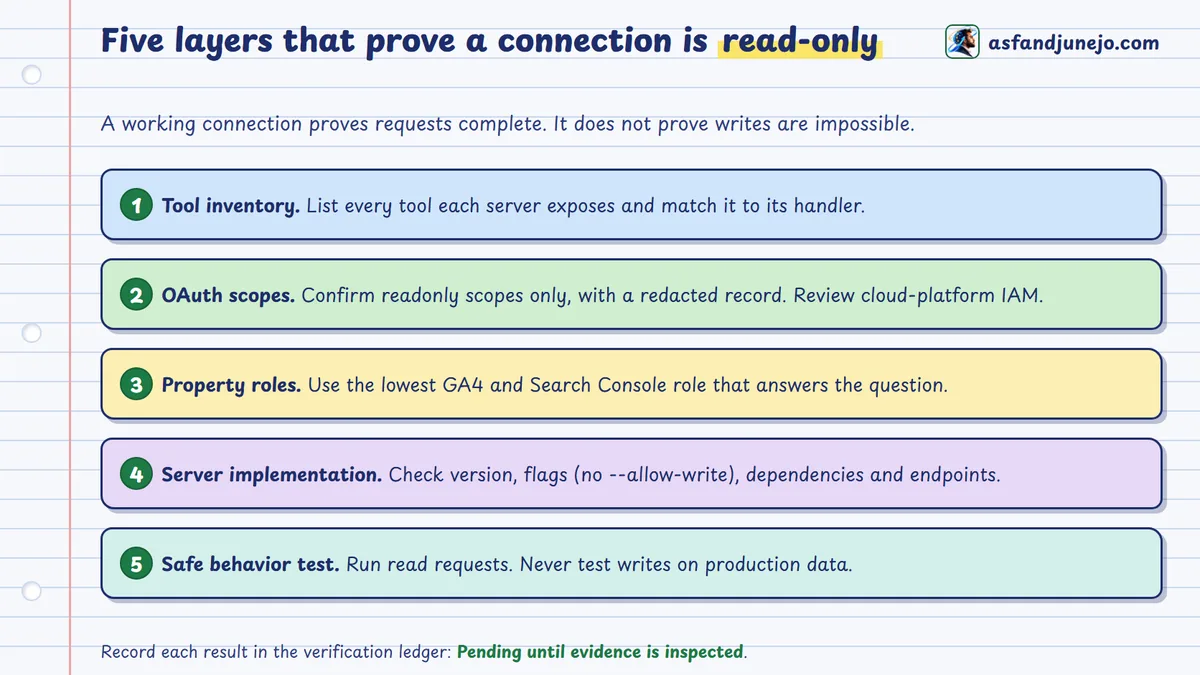
A successful connection test shows that an API request can complete, not that the integration cannot make changes. An instruction such as "never change anything" sets the assistant's task boundary but is not authorization. Where stronger privileges exist, protection depends on the assistant obeying and on the surrounding tool controls.
Layer 1: Inspect the MCP tool inventory
List the tools each server exposes. Compare Analytics against the table above, with the write tool absent, and compare the Search Console server with its documented allowlist. An unexpected tool should stop the work before real client data is processed. Names alone are not evidence: where source is available, inspect each handler and the Google endpoint behind it.
| Integration | Expected capabilities | Modification tools |
|---|---|---|
| Analytics MCP | Account discovery, property metadata, reporting | Must not be enabled |
| Search Console MCP | Property discovery, Search Analytics, URL inspection | Must not be enabled |
Layer 2: Inspect OAuth permissions
Confirm each credential grants only the intended read-only scopes: webmasters.readonly for Search Console (not webmasters) and analytics.readonly for Analytics (not analytics.edit). If shared ADC includes cloud-platform, review the identity's IAM permissions; a scope inventory must not be summarized as "all Google Cloud access is read-only". Keep access tokens, refresh tokens, client secrets and private keys out of logs. The evidence is a redacted authorization record naming scopes, credential type and restrictions.
Layer 3: Inspect effective property permissions
Scopes and property roles govern different things. An account can hold a read-only scope and still have an elevated role in the GA4 property, which is a governance concern. Conversely, a suitable scope cannot retrieve data from a property the principal cannot access. Use reporting-level access where it is enough and remove inherited or unneeded privileges where policy allows.
Layer 4: Review the server's actual implementation
Do not rely on README statements alone. Record the installed package version, dependency lock information, permitted API endpoints, exposed tools, optional flags, network destinations and any dynamic or arbitrary-request feature. For the Analytics server, confirm the absence of --allow-write. For the Search Console server, verify its client is limited to reporting and inspection. A hint such as readOnlyHint=true describes intended behavior; the implementation and effective permissions are stronger evidence.
Layer 5: Validate behavior without risking production
Do not prove read-only behavior by asking Claude to delete a real property, submit an unwanted sitemap or alter a live Analytics configuration. Inspect tool schemas and code, check scopes, run representative read requests and, where needed, test authorization failures in a controlled environment. A server with no sitemap-submission tool and a webmasters.readonly credential is stronger evidence than a promise not to use a write tool. This still does not prove the absence of every vulnerability; it supports a narrower, auditable claim about intended and observed permissions.
Record the result in a verification ledger
Mark an item verified only after its evidence has been inspected. The table below is intentionally not filled with invented test results. The free kit below extends it into a 35-control ledger that also covers scope, credential handling, prompt-injection controls, data-processing terms, re-review triggers and sign-off, with an overall status that updates as you fill it in.
| Control | Evidence required | Result |
|---|---|---|
| Analytics MCP version | Package and source reference | Pending validation |
| Analytics write mode | Effective launch arguments | Pending validation |
| Analytics OAuth scope | Redacted scope record | Pending validation |
| GSC MCP implementation | Exact package and version | Pending validation |
| GSC tool allowlist | Manifest and handler review | Pending validation |
| GSC OAuth scope | Redacted scope record | Pending validation |
| GA4 property access | Effective reporting permissions | Pending validation |
| GSC property access | Effective property permissions | Pending validation |
| API communication | Successful approved read queries | Pending validation |
| Credential security | Storage and exposure review | Pending validation |
What does a successful verification mean?
Within the tested version and authorization boundaries, Claude can request the permitted reports without the modification operations your design excludes. It does not mean Claude's interpretations will always be right, that sensitive data cannot leak, or that a later package update will behave identically. Those are separate assurance problems, and the next stage is analytical: can Claude separate observed changes from plausible explanations and demonstrated causes?
How do you investigate organic traffic changes using Claude?
Establish what changed before asking why: retrieve comparable Search Console and GA4 data for explicit periods, calculate the change, challenge each explanation and record what evidence is still missing.
A lower session count may look like lost visibility, yet the cause could be measurement, attribution, search demand, site accessibility or visitor mix. Run the work as a sequence of constrained questions, not a single instruction like "Analyze my SEO and tell me what's wrong."
Step 1: Define the investigation before retrieving data
State the question, the population and the comparison period first, for example: Did Google organic performance decline over the latest 28 finalized days compared with the preceding 28, and what evidence supports or contradicts each explanation? Use the latest date for which the needed Search Console data is finalized as the shared endpoint, with the preceding period the same number of days. Two consecutive 28-day windows contain the same weekdays, but they do not remove seasonality, holidays, campaigns or market change, so add a year-over-year view before claiming a sustained trend. The API's dataState parameter separates finalized data from newer, possibly incomplete data.[5]
| Investigation field | Required information |
|---|---|
| Search Console property | Exact domain or URL-prefix identifier |
| Analytics property | GA4 numeric property ID |
| Current period | 28 finalized calendar days |
| Comparison period | Preceding 28 calendar days |
| Search type | Web, unless another surface is explicitly under study |
| Analytics population | Google organic sessions where comparable |
| Segmentation | Landing page, device, country and date as appropriate |
| Business outcomes | Explicitly defined, properly measured key events |
| Interpretation standard | Observation, hypothesis, contradiction, conclusion |
| Execution permission | Read-only analysis |
Record the objective before you see results. Otherwise it is easy to redefine the question around an interesting pattern and make a convenient explanation look stronger than the evidence.
Step 2: Retrieve Search Console performance
Start with the overall movement and avoid high-cardinality query or page dimensions at first. Retrieve clicks, impressions, CTR and average position for each period, with property, search type, dates and filters recorded. A Search Analytics request has this shape (a template, not an executed response):
{
  "startDate": "YYYY-MM-DD",
  "endDate": "YYYY-MM-DD",
  "dimensions": ["date"],
  "type": "web",
  "dataState": "final",
  "rowLimit": 25000
}
Retrieve aggregates separately for overall performance; do not assume detailed query rows add up to the property total. Google's documentation notes a maximum of 25,000 rows per request and a daily limit on rows exposed per search type. Pagination retrieves more available rows but cannot recover data Google withholds.[5][7] Add page, country and device cuts next, and query-level cuts only when they help answer the question, with their incompleteness stated.
Step 3: Retrieve comparable GA4 measurements
Query GA4 for the same explicit dates, the correct property and a documented traffic definition. The Data API offers metrics such as sessions, engagedSessions, engagementRate and keyEvents, and dimensions such as date, landingPage, sessionSourceMedium and sessionDefaultChannelGroup. To compare with Search Console, filtering to Google organic is usually better than all Organic Search, which can include other engines.[10]
{
  "dateRanges": [{ "startDate": "YYYY-MM-DD", "endDate": "YYYY-MM-DD" }],
  "dimensions": [{ "name": "date" }, { "name": "sessionSourceMedium" }],
  "metrics": [
    { "name": "sessions" },
    { "name": "engagedSessions" },
    { "name": "keyEvents" }
  ],
  "dimensionFilter": {
    "filter": {
      "fieldName": "sessionSourceMedium",
      "stringFilter": { "matchType": "EXACT", "value": "google / organic" }
    }
  }
}
This illustrates the underlying parameters; the real MCP call must follow your installed server's tool schema. Check the filter against your property's attribution configuration and the source values you actually see, and use the API's compatibility metadata to confirm the metric and dimension combination is allowed.
Step 4: Identify the direction and size of the change
For additive metrics such as clicks or sessions, percentage change is (current minus previous) divided by previous, times 100. Report it with its baseline and dates. When the previous value is zero, the change is undefined and must not be shown as a finite growth rate. For rates like CTR, separate percentage-point change from relative change: a CTR moving from 4% to 3% is a one-point decline and a 25% relative reduction. Average position is impression-weighted, not additive, and a shift in query and page mix can move it even when individual rankings did not, so analyze position within comparable segments before blaming rankings.
| Measurement | Previous period | Current period | Interpretation |
|---|---|---|---|
| GSC clicks | Retrieved value | Retrieved value | Google Search click movement |
| GSC impressions | Retrieved value | Retrieved value | Search exposure movement |
| GSC CTR | Retrieved value | Retrieved value | Click propensity within measured exposure |
| GSC average position | Retrieved value | Retrieved value | Needs a query-mix review |
| GA4 Google organic sessions | Retrieved value | Retrieved value | On-site visit movement |
| GA4 engagement rate | Retrieved value | Retrieved value | Engagement context |
| Relevant GA4 key events | Retrieved value | Retrieved value | Defined business interactions |
Draw no conclusion until the underlying values are back and their definitions are confirmed.
Step 5: Distinguish observations from explanations
A useful investigation challenges its own interpretation. Four patterns come up often.
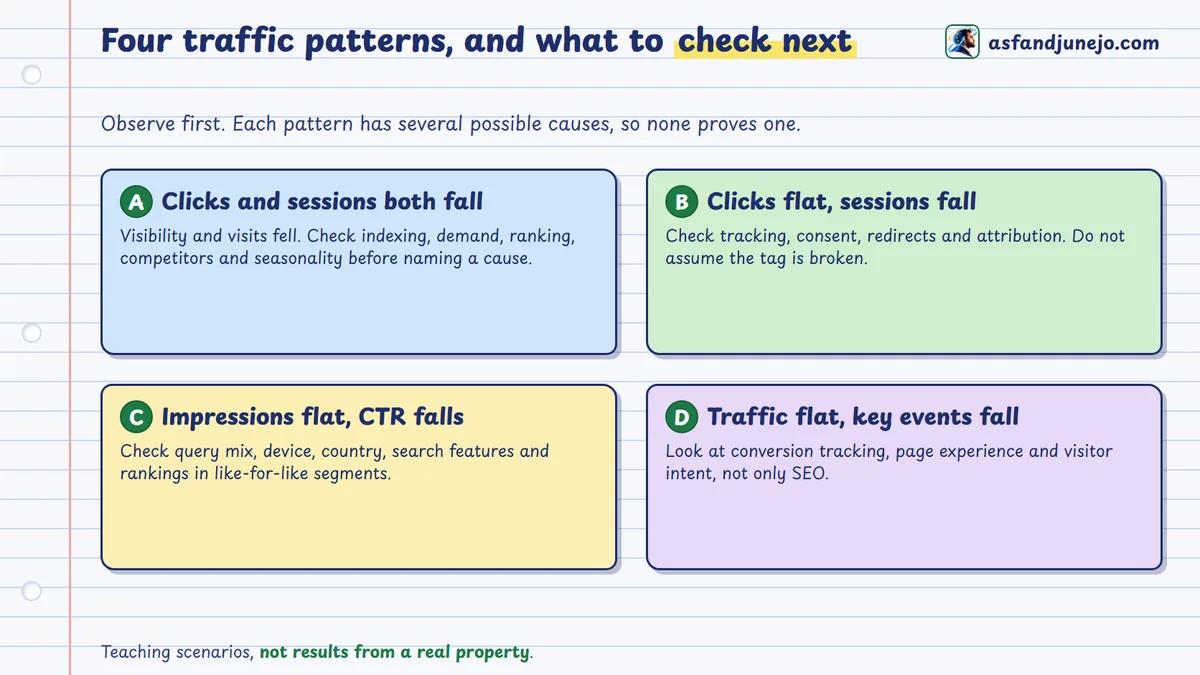
| Pattern | What it supports | What to check before concluding |
|---|---|---|
| A. GSC clicks and GA4 Google organic sessions both fall | Search interaction and measured visits fell | Indexing, ranking, competitors and demand; it does not establish an update or technical fault |
| B. GSC clicks stable, GA4 sessions fall | A possible measurement or attribution gap | Collection, consent, redirects and attribution; it does not prove the analytics setup is broken |
| C. Impressions stable, clicks and CTR fall | A change in how exposure converts to clicks | Query mix, device, country, search appearance and like-for-like rankings; an aggregate CTR drop does not prove titles need rewriting |
| D. Search traffic stable, key events fall | A problem that may sit outside acquisition | Conversion measurement, user experience, intent and implementation consistency |
Step 6: Require contradictory evidence before recommending changes
Once an explanation exists, make Claude name the evidence that would weaken it. If you blame ranking losses, examine comparable queries, pages, countries, devices and historical demand. If you suspect an indexing problem, look for current index evidence instead of treating a drop as proof of deindexation. The URL Inspection API reports Google's indexed version of a page, not a live test of the page as it is now. Where an explanation needs crawl data, server logs, deployment records or external demand data, name the missing source instead of inventing an explanation from dashboards. The investigation is complete only when a reader can tell the measurements, the remaining hypotheses and the evidence needed to choose among them.[5]
Why do Google Analytics and Search Console numbers not always match?
They measure different things: Search Console counts search-result impressions and clicks, while GA4 counts sessions and events collected on your site, so gaps are expected and should be explained through definitions, attribution, scope and collection.[7]
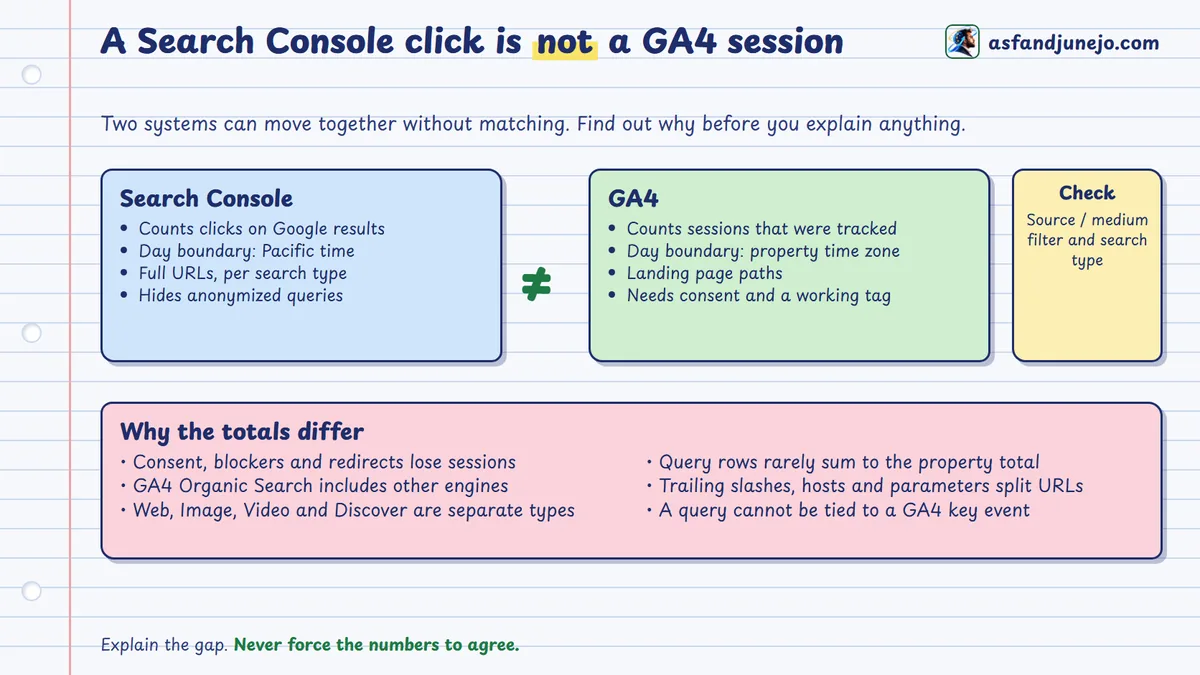
One of the costliest mistakes in automated SEO analysis is letting an AI compare two similarly named metrics without noticing they come from different processes. Five differences cause most of the trouble.
Why are Search Console clicks not GA4 sessions?
A click records a qualifying interaction with a result in Google Search. A session groups recorded interactions on your site. Visitors may leave before analytics fires, block collection through browser or consent settings, or hit redirects that affect attribution. Sessions can also arise that do not map one-to-one to clicks. Google itself acknowledges discrepancies between Search Console and other tools from URL coverage, processing, JavaScript-based collection and privacy protections.[7]
Why might the populations differ?
The commonest mismatch compares all GA4 Organic Search sessions with Search Console Web clicks. GA4's organic channel can include other search engines, while a Search Console property reports only Google surfaces. Search Console also reports separate types (Web, Image, Video, News, Discover where supported), and a Web comparison must not silently include them. For a closer match, use an explicit Google organic segment, the intended search type, comparable site coverage and aligned periods. Even then, totals will not match exactly.
Do time zones create daily differences?
Yes. Search Console's daily data follows Pacific time, while GA4 uses the property's configured reporting time zone. Daily movements near midnight boundaries may cover different intervals. That does not invalidate a comparison, and long, clearly defined periods reduce the effect without removing it. If you need exact alignment, use time-granular exports.
Why do query rows not add up to the total?
Search Console withholds some low-frequency or sensitive queries for privacy and limits which detailed rows it exposes, so summing a query report can fall below the property-level figure. Google's troubleshooting guidance lists anonymized queries, aggregation differences, row limits and filtering as reasons totals diverge. This is a documented limitation, not an error by GA4 or Claude, and an assistant must not invent an "unknown keywords" bucket of fictional queries to make the detail match the total.[7]
Why do page identifiers need reconciling?
Search Console page rows hold full URLs such as https://www.example.com/services/seo/, while GA4's landingPage holds a path such as /services/seo/. The mapping is not guaranteed one-to-one: a domain property can span subdomains and protocols, GA4 may collect from several streams, and redirects, query parameters, trailing slashes and canonicals all complicate matching. Use an explicit reconciliation policy that keeps the raw identifiers and logs each transformation. Do not strip query strings or merge hosts without asking whether the difference matters for the question.
A practical reconciliation matrix
| Difference | Primary explanation to examine | Required validation |
|---|---|---|
| GSC clicks exceed GA4 sessions | Collection, attribution, session definition | Tagging, consent, redirects, traffic scope |
| GA4 sessions exceed GSC clicks | Non-identical populations, attribution or session behavior | Source/medium and search-type filters |
| Page-level totals differ | URL normalization and property coverage | Full URL to landing-path mapping |
| Query rows do not sum to totals | Anonymization and row limits | Aggregate versus query-level GSC requests |
| Daily trends differ slightly | Reporting time zone and freshness | Dates, property time zone, finalized data |
| Key events differ from expectations | Measurement setup and event definitions | Event configuration and reporting scope |
| Apparent ranking decline | Query mix or impression distribution | Comparable query and page segmentation |
A successful reconciliation does not make the numbers identical. It makes the remaining difference understood well enough for the decision at hand. Linking the two products in Google's native integration exposes some Search Console reports inside GA4, but it does not remove the underlying differences or provide query-level attribution for business events. A page with high visibility and many key events does not prove that a particular query produced them; without attribution evidence that is an inference.
Which five read-only SEO workflows are worth running with Claude?
Narrow investigations that tie one question to specific metrics, verification rules and a decision. Read-only access is enough because the goal is to retrieve and interpret evidence, not change anything.
| Workflow | Question it answers | Main caution |
|---|---|---|
| 1. Pages losing visibility | Which landing pages lost clicks or impressions? | Weigh absolute loss against percentage change from small baselines |
| 2. CTR opportunities | Which high-impression pages may warrant a SERP review? | Low CTR is not automatically a snippet problem |
| 3. Weak business outcomes | Which organic landing pages engage but do not convert? | Group pages by purpose before judging |
| 4. Branded versus nonbranded | How did visible brand and non-brand demand move? | Query data is incomplete; the result is directional |
| 5. Monthly review | What changed, what is supported, what is unresolved? | Verify figures; a fast draft is not a cheaper process if it needs heavy repair |
Workflow 1: Which pages are losing organic visibility?
Retrieve current and comparison Search Console page data, calculate changes for comparable URLs and check whether the decline clusters by page type, country, device or query group. A page losing many clicks may deserve attention at a modest percentage, while a page falling from a tiny baseline can look dramatic with little impact. The result is a prioritized list of investigations, not an instruction to update every declining page.
Using the Search Console MCP connection, compare page-level Web Search clicks
and impressions across the last two complete 28-day periods. Identify URLs with
meaningful losses based on absolute and relative change, as well as prior
traffic contribution. Exclude incomplete dates. Separate verified declines from
potential explanations, and provide the exact query parameters used.
Workflow 2: Which high-impression pages have a possible CTR opportunity?
CTR depends on position, query intent, search features, device mix, brand familiarity and the competitive environment. Compare pages and queries in reasonably similar contexts, then flag cases where a SERP review would help. Output a candidate URL, query group, supporting measurements, competing explanations and a proposed check.
Retrieve Search Console Web Search impressions, clicks, CTR, and average
position for the selected pages. Segment by relevant query, country, and device
dimensions. Identify possible CTR opportunities, but do not assume that low CTR
results from titles or descriptions. Explain what additional SERP evidence would
be needed before recommending changes.
Workflow 3: Which organic landing pages have weak business outcomes?
Combine Search Console visibility with GA4 sessions and key events. An informational article may satisfy a research query without producing a lead, while a service page exists for inquiry, so a universal conversion threshold ignores their different jobs. The output should say whether further work belongs to content relevance, conversion design, measurement accuracy or something else.
Identify landing pages receiving meaningful Google organic sessions in GA4 and
relevant Google Search visibility in Search Console. Compare engagement and
explicitly defined key events. Group pages by intended purpose before
interpreting performance. Do not assign individual GSC queries to GA4
conversions without supporting attribution evidence.
Workflow 4: How did branded and nonbranded search change?
Classify available queries with an approved brand-term dictionary, then compare visible clicks and impressions. Brand names can be ambiguous or appear inside unrelated searches, and anonymized queries are missing, so the outcome is a directional view of available demand, not a complete brand-search market-share estimate.
Using the approved brand-term dictionary, classify available Search Console
queries into branded, nonbranded, and ambiguous groups. Compare current and
previous performance, while noting that unidentified or excluded query data is a
limitation. Do not claim that the classified queries represent 100% of total
property searches.
Workflow 5: How do you prepare an evidence-led monthly review?
Claude retrieves standard metrics from both platforms and drafts a structure; the analyst verifies figures, tests alternatives and decides which recommendations stand. Measure the real efficiency including data preparation, AI execution, verification, correction and final review.
Prepare a monthly SEO performance review using verified Search Console and GA4
reports. Include reporting periods, property identifiers, traffic definitions,
important changes, affected landing pages, engagement and key-event context,
data limitations, alternative explanations, and recommended next investigations.
Cite each finding to its source query. Do not present hypotheses as established
causes or authorize changes.
How do you troubleshoot Claude, Analytics MCP and Search Console connections?
Find the failing layer first (MCP process, Google authentication, property authorization, API request or report result), record the error without credentials, and test the smallest operation that separates the competing causes.
A disconnected server is not an insufficient scope, and an empty report is not proof of failed authentication.
| Symptom | Possible causes | Recommended investigation |
|---|---|---|
| MCP server disconnected | Executable unavailable, invalid configuration, runtime failure | Check executable path, JSON and startup logs |
| Authentication failed | Missing, expired or misplaced credentials | Check ADC configuration and credential identity |
| HTTP 401 | Invalid or missing authentication | Inspect the OAuth flow and token validity |
| HTTP 403 | Insufficient property access or OAuth permissions | Inspect scopes, roles and the requested property |
| HTTP 400 | Unsupported dimensions, invalid dates or a malformed request | Check the API schema and parameters |
| HTTP 429 | API quota or resource exhaustion | Inspect quotas and reduce request load |
| Missing GA4 property | Wrong account or insufficient Analytics role | Verify the property ID and user access |
| Missing GSC property | Wrong account or property identifier | Check domain versus URL-prefix property |
| Empty result | No qualifying data, filters, dates or restrictions | Run a minimal unfiltered query |
| Unexpected totals | Scope, aggregation, filtering or measurement differences | Compare raw requests and definitions |
Google's Analytics API error documentation describes responses such as INVALID_ARGUMENT, UNAUTHENTICATED, PERMISSION_DENIED and RESOURCE_EXHAUSTED. The error body usually says more than the status code.[10]
What if the MCP server fails to start?
Investigate the launch before Google permissions. Confirm the configured command resolves to an installed executable and that pipx or uvx is reachable from the graphical app, which may not inherit your shell's path; an absolute path may be needed. The configuration must be valid JSON with escaped Windows paths. In Claude Code, inspect registered servers:
claude mcp list
claude mcp get analytics-mcp
What if authentication works but the property is missing?
A successful OAuth flow proves an identity, not access to the property. Check the authenticated account, Cloud project, property ID and the role inside the product. For Search Console, confirm the right domain or URL-prefix property; one that belongs to another account may return a permissions error or simply not be listed. Fix it with the minimum access change, not by promoting the account to administrator.
What if Claude returns an empty report?
An empty report is ambiguous until you inspect the request. The period may have no data, the search type may be wrong, the property may be new or the filters may exclude everything. Begin with a short date-grouped request without restrictive dimensions or filters, as Google's documentation recommends, and for GA4 use a basic supported metric and dimension. If that works, restore the original filters one at a time.
What if API quotas interrupt the analysis?
Both APIs enforce quotas. GA4 uses token-based quotas for several reporting methods, and request complexity, dimension cardinality, date range and concurrency affect consumption. Search Console limits request rate and query load, and page-plus-query requests over long periods cost more than narrow ones. Do not resubmit the same failing request: remove unneeded dimensions, shorten the range, reuse cached results where safe and retry with bounded back-off.[10][11]
When does troubleshooting become a security problem?
When a server unexpectedly asks for broader permissions or exposes a modification tool it did not have before.
Stop the workflow, examine the server and credential configuration, and decide whether the change was expected and authorized. Never grant broader access just to silence an authentication error.
What are the security, privacy, data quality and human oversight rules?
Read-only access limits modification but does not prevent data disclosure, prompt injection, wrong analysis or excess API use, so govern the server, credentials, tool output, data sensitivity and approvals as well.
| Risk | Why read-only does not cover it | Control |
|---|---|---|
| Data leaves your machine | Returned data is processed in the Claude conversation | Review terms, retention and plan settings before using client or personal data |
| Supply chain | A package or update may expose an undocumented operation | Check provenance, pin versions, review tools and network destinations |
| Prompt injection | Tool output is external data and may contain instructions | Restrict tools, treat output as untrusted, require approval for consequential actions |
| Credential exposure | Tokens and keys leak through prompts, logs and screenshots | Short-lived or managed credentials; redacted logs; revoke on suspicion |
| Over-collection | Granular data is available but not needed | Data minimization; aggregates first |
| Unapproved action | Recommendations still drive site changes | Named decision owner and a separate implementation process |
Does read-only mean the data stays local?
No. A local server retrieves data directly from Google, but what it returns may be processed under Anthropic's service arrangements. A third-party remote MCP server adds another organization to the data flow. The question is not only whether data can be modified but who can access, process, retain, transmit or recover it.[8]
Why do third-party MCP servers add supply-chain risk?
Open-source, package-manager distribution or external hosting does not make a server trustworthy. A dependency could change, a maintainer could publish an unexpected update, or the installed code could expose an operation its documentation omits. Review provenance, dependency integrity, version pinning, permitted network destinations and actual tool behavior. Anthropic's custom connector guidance advises reviewing requested permissions, connecting only to trusted servers, watching for prompt injection and monitoring behavior changes. A package's own read-only claim is supporting information, not a replacement for verification.[8]
Why consider prompt injection separately from OAuth?
A tool response is external data. It may contain text the analyst did not write, and a malicious or compromised response could try to steer the assistant or prompt it to disclose information. Read-only OAuth limits changes through those Google APIs, but it does not stop an assistant sending retrieved data to another enabled service that can transmit it. Restrict tools across the whole assistant environment, not just inside the two servers.
How do you protect credentials and logs?
Keep refresh tokens, access tokens, service-account keys and application credentials out of prompts, public repositories, screenshots and downloadable examples. Prefer short-lived or managed identity. Log the credential type, approved scopes, package version, property ID and timestamp, never the token values. If you suspect compromise, revoke or replace the credentials through Google's controls, investigate the environment and confirm unnecessary access is gone. Disconnecting an MCP server from Claude does not revoke Google authorizations or delete local credential files.
How do you limit unnecessary data exposure?
An investigation into landing-page traffic rarely needs user identifiers, transaction records or every property in an organization. Where aggregate reporting answers the question, do not retrieve granular data just because it is available, and weigh sensitivity before transferring it, especially under client contracts or regulation.
Why must human approval stay in the loop?
Claude might suggest changing canonicals, rewriting content, consolidating pages, adjusting internal links or modifying conversion tracking. Assess those through a separate implementation process with evidence, a defined decision owner and validation before execution. Read-only analysis is not authorization to carry out its recommendations through other tools. I develop that separation in AI in SEO: what to automate, what to verify and what to keep human, and the same split between evidence and action drives the diagnostic method for the September 2026 spam update.
What is the reusable Claude SEO prompt and evidence log?
A single master prompt that fixes the permitted sources, reporting population, procedure, evidence standard and prohibitions before any data is retrieved, plus a claim ledger so each conclusion keeps its own evidence status.
Defining these up front makes the investigation reviewable and repeatable and requires Claude to name unsupported conclusions instead of turning every pattern into an action. Adapt it for one property or an approved portfolio.
Master read-only SEO investigation prompt
ROLE
You are an evidence-led SEO performance analyst.

OBJECTIVE
Investigate changes in Google organic search performance using the connected
Google Analytics 4 and Google Search Console MCP tools.

ACCESS RESTRICTIONS
Use only the approved read-only MCP integrations.
Do not modify:
- Google Analytics properties
- Google Search Console properties
- Sitemaps
- Website content
- Indexation settings
- Tracking configurations
- Access permissions
Do not invoke unrelated tools or transmit retrieved information to other
external services.

DATA SCOPE
Use the approved GA4 property and Search Console property.
Identify:
- Exact property IDs
- Google Search type
- Reporting time zones
- Date ranges
- Dimensions
- Metrics
- Filters
- API data limitations

REPORTING PERIODS
Use the most recent 28 finalized days available in Search Console.
Compare with the preceding 28 calendar days.
Use the same explicit calendar-date boundaries in GA4.
Explain any remaining time-zone mismatch.

ANALYSIS PROCEDURE
1. Retrieve aggregate GSC clicks, impressions, CTR, and average position.
2. Retrieve GA4 sessions, engaged sessions, and approved business key events.
3. Restrict GA4 analysis to an explicitly defined Google organic population
   where appropriate.
4. Calculate absolute and relative changes.
5. Identify affected landing pages, countries, devices, and relevant available
   query groups.
6. Distinguish metric-definition differences and reporting limitations.
7. Identify possible explanations.
8. Search for contradictory evidence.
9. State what additional evidence would be required to establish causality.
10. Recommend only actions justified by the evidence.

EVIDENCE REQUIREMENTS
For every material numerical claim, report:
- Source system
- Property
- Date range
- Query dimensions and filters
- Retrieved values
- Calculation
- Evidence limitation
Do not invent unavailable measurements.
Do not assume that:
- GSC clicks equal GA4 sessions
- Organic Search means Google organic only
- Query-level GSC data is complete
- A ranking decline caused a traffic decline
- A GSC query produced a GA4 key event
- Correlation establishes causation

REQUIRED OUTPUT
A. Verified observations
B. Data reconciliation findings
C. Competing hypotheses
D. Contradictory evidence
E. Missing evidence
F. Recommended next investigations
G. Proposed actions requiring human approval
H. Source and calculation ledger
If the evidence is insufficient, say so explicitly.
Do not execute any changes.
What goes in the evidence log?
Keep the same record next to every significant conclusion.
| Field | What must be recorded |
|---|---|
| Claim ID | Unique identifier |
| Claim | Exact statement under evaluation |
| Claim type | Fact, calculation, inference or recommendation |
| Source system | GA4, GSC or other approved evidence |
| Source request | API method, dates, dimensions, filters |
| Retrieved values | Original relevant measurements |
| Calculation | Formula and result |
| Limitations | Missingness, attribution, aggregation, uncertainty |
| Contradiction | Evidence weakening the first interpretation |
| Status | Verified, conditional, unsupported or rejected |
| Decision owner | Responsible reviewer |
| Review date | Date of the evidence assessment |
"Organic clicks declined" needs the property, dates, search type, values and change calculation. "An algorithm update caused the decline" needs more evidence than the traffic comparison can give. The ledger stops the second statement inheriting the status of the first just because they share a narrative.
How do you set a decision boundary?
Move a recommendation past investigation only when its evidence and consequences are clear. Keep these stages distinct in the output: observed condition, verified measurements, competing explanations, evidence assessment, recommended intervention, human approval, then separate execution and validation. Unsupported recommendations can then be rejected without discarding valid observations, because a metric can be real even when the proposed explanation is wrong.
Where can you get the free resource kit?
Join Search Signals with your email and two files unlock on this page straight away: the full resource kit (ZIP) and the evidence audit workbook (Excel).
The kit holds a read-only access audit checklist, nine copy-paste Claude prompts, the GA4 and Search Console reconciliation playbook and a nine-tab workbook. The workbook adds a 35-control Verification Ledger with an overall status and a five-layer guide to the tabs for setup, access controls, source provenance, metric reconciliation, claims, decisions and troubleshooting. The templates contain no real client values and no completed verification claims, and they have not been tested against a customer configuration.
- Claude + GA4 + Search Console Resource Kit (ZIP)Checklist, prompt library, playbook and workbook, branded PDFs plus editable text
- GA4 and GSC Evidence Audit WorkbookExcel workbook, 9 tabs including the Verification Ledger
Frequently asked questions
Can Claude connect directly to Google Analytics 4?
Yes, through a compatible MCP server such as Google's published Analytics MCP implementation. It needs an authenticated Google identity, enabled APIs and access to the property, and Claude only sees what the server's tools return, not the Analytics interface.[2]
Can Claude connect to Google Search Console?
Yes, through a compatible Search Console MCP server that retrieves search performance and property information. The tools and permissions depend on the implementation, so choose a reviewed server that uses webmasters.readonly rather than one that needs broader write permissions.[9]
Is Claude's Google Analytics connection automatically read-only?
No. Google's integration is designed for read requests, but the repository documents an optional write mode, so check enabled operations, OAuth scopes and property permissions before giving any security assurance.[2]
Can Claude change my sitemap or indexing settings?
Not through a Search Console connection that exposes only read tools and uses the webmasters.readonly scope. A different server with broader tools and permissions might, so review the full tool list and credentials instead of assuming all integrations behave alike.[3]
Does connecting Claude to Google Analytics require Google Cloud?
Yes for the official setup, which uses a Cloud project to manage enabled APIs and authentication. A GA4 property is a separate resource, and enabling APIs in Cloud does not grant reporting access to any property.[2]
Can Claude explain why organic traffic dropped?
It can identify changes, examine segments, propose explanations and name the evidence still needed, but a drop in clicks, impressions, rankings or sessions does not by itself establish a cause. Diagnosis may also need crawl data, release history, server logs, search-demand data or direct site inspection.
Can Claude analyze Search Console queries and GA4 conversions together?
It can analyze both in one investigation, but it should not attribute individual Search Console queries to GA4 conversions without attribution evidence, because the two systems measure and attribute differently.[7]
Why are Search Console clicks different from GA4 organic sessions?
They count different events over possibly different populations, and time zones, attribution, browser and consent behavior, tracking setup, URL coverage and processing all contribute. Do not expect an exact match.[7]
Is connecting a third-party MCP server to Claude safe?
It depends on the server's implementation, permissions, maintenance, hosting and data-processing terms. Review its source integrity, dependencies, credential handling, tools, network behavior and update practice, and verify its security claims independently where compromise would be costly.[8]
Is MCP necessary to analyze GA4 and Search Console data with Claude?
No. You can export authorized reports and give them to Claude. MCP helps when you need repeatable, authenticated retrieval, while approved exports can be simpler and expose less for small or infrequent investigations.
Can a read-only Claude workflow replace an SEO analyst?
No. It can help with retrieval, comparison, summarizing and spotting patterns to investigate, but reconciling metrics, testing alternative explanations, judging business context and approving changes still need a person.
Final analysis: a read-only connection is where reliable SEO analysis starts
The connection makes analysis faster to start; only narrow credentials, reviewed tools and traceable evidence make it trustworthy.
Search Console and GA4 keep different definitions, limits and attribution. An MCP server may expose more than the task needs. A persuasive explanation of falling traffic may rest on evidence nobody has retrieved. Those distinctions are easy to miss when an assistant writes a fluent answer, and they decide whether its recommendations deserve to influence strategy.
A responsible setup starts with narrowly scoped credentials and independently reviewed tools. Its analysis moves from measured observations to competing hypotheses, with calculations and source requests kept for checking. Recommendations stay separate from implementation authority, and gaps in the evidence are stated instead of filled with confident guesses. The goal is not SEO answers without people. It is less time spent collecting evidence, with the standard for interpreting it left explicit.
Sources and method
Setup steps and security guidance trace to Google and Anthropic documentation and to the packages' own pages, listed below; the diagrams and tables are teaching frameworks, not measured results from any site.
I checked the Analytics MCP tool list, its read and write split, the --allow-write flag and the environment variable names against Google's repository on October 28, 2026, and the existence, version and tool list of gsc-readonly-mcp against its PyPI page the same day. I have not run the full procedure end to end on a client property for this article. Package versions, scopes, effective tool permissions and any reported performance must be verified in your own environment before you present a setup as tested.
- Google. Google Analytics MCP overview. developers.google.com (opens in a new tab)
- Google Analytics. google-analytics-mcp source repository. github.com (opens in a new tab)
- Google. Authorizing requests to the Search Console API (OAuth scopes). developers.google.com (opens in a new tab)
- Google. Analytics Data API schema and scopes. developers.google.com (opens in a new tab)
- Google. Search Analytics: query. developers.google.com (opens in a new tab)
- Anthropic. Claude Code MCP documentation. code.claude.com (opens in a new tab)
- Google Search Console Help. Performance report data and discrepancies. support.google.com (opens in a new tab)
- Anthropic. Get started with custom connectors using remote MCP. support.claude.com (opens in a new tab)
- Murtazina, Y. gsc-readonly-mcp on PyPI. pypi.org (opens in a new tab)
- Google. Analytics Data API basics and quotas. developers.google.com (opens in a new tab)
- Google. Search Console API usage limits. developers.google.com (opens in a new tab)
Confirmed Tool names, write flag, scopes and package details checked against the sources above. Hypothesis The diagnostic patterns and the five-layer audit are editorial frameworks.